WhatsApp error 131049: why "not delivered to maintain healthy ecosystem engagement" happens and how to reduce it
Error 131049 means WhatsApp chose not to deliver a marketing template because the recipient has hit their per-user marketing limit. What it means, why it happens, what it is not, and the steps that actually reduce it, checked against Meta's documentation.
The short answer
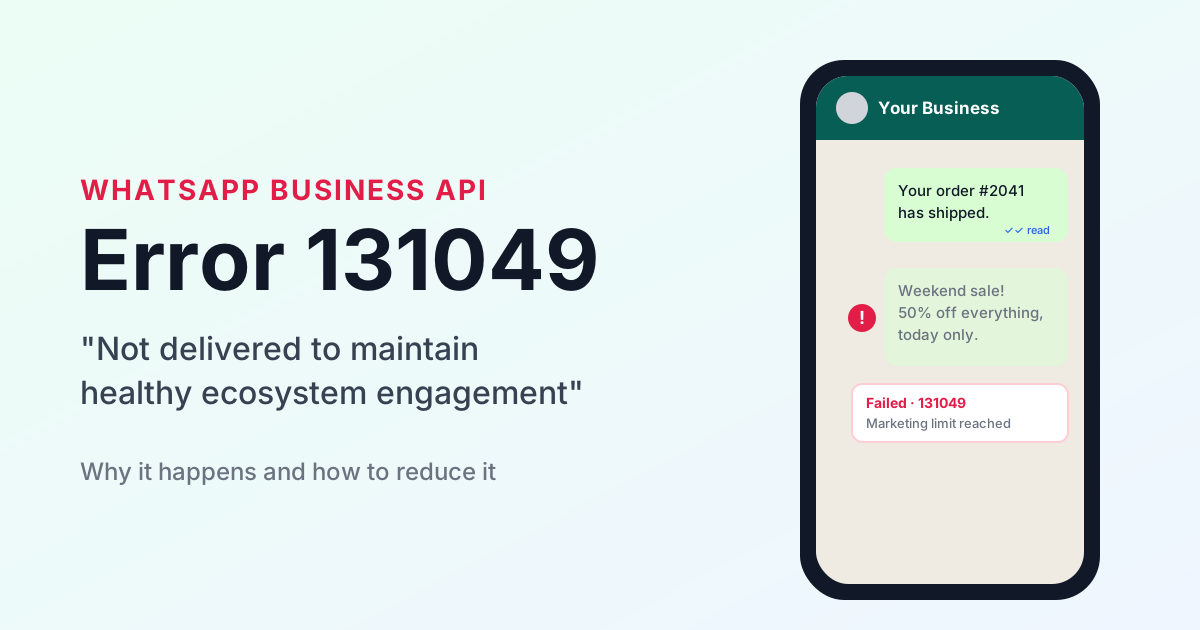
Error 131049 means WhatsApp itself chose not to deliver a marketing template, because that recipient has recently had more marketing than WhatsApp thinks they will engage with. Your account is not banned, your number is healthy, and Meta does not charge for these undelivered messages (Meta pricing).
What the error means
Meta's error-code reference lists 131049 as "This message was not delivered to maintain healthy ecosystem engagement" and links it to its per-user marketing template limits (Meta error codes).
If your dashboard shows that sentence two or three times in a row, it is still one error. Meta sends each failure with a title, a message and a details field, and for 131049 the first two are identical while the third rewords them. A real Meta webhook for this error, posted on Meta's developer forum, shows exactly that text (Meta community thread).
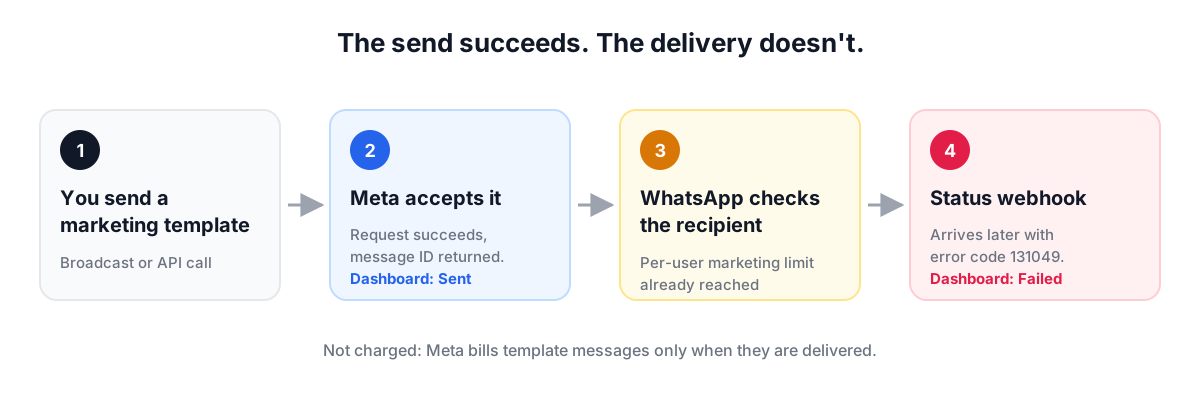
The failure arrives after sending. Meta accepts the send request, then reports the drop later through a status webhook (Meta per-user limits). That is why these messages first appear as sent and later turn to failed.
Why it happens
WhatsApp caps how many marketing templates each person receives from all businesses combined, and the cap is set per person. Meta's documentation (updated 17 June 2026) describes it this way (Meta per-user limits):
- It is decided per recipient. WhatsApp looks at that person's recent marketing read rate and how many messages from friends, family and businesses already sit in their inbox.
- It changes over time. The limit adapts automatically to the person's recent engagement. Someone who stops reading marketing gets fewer marketing messages delivered.
- Only delivered marketing templates count toward the limit.
- Replies open a free pass. When the person replies, a 24-hour customer service window opens, and marketing messages sent inside that window do not count toward the limit.
- "Not interested" feedback lowers it. A person can mark your business "Not interested" under WhatsApp's Offers and announcements setting, which Meta says can affect the per-user limit between you and that person (Meta marketing templates).
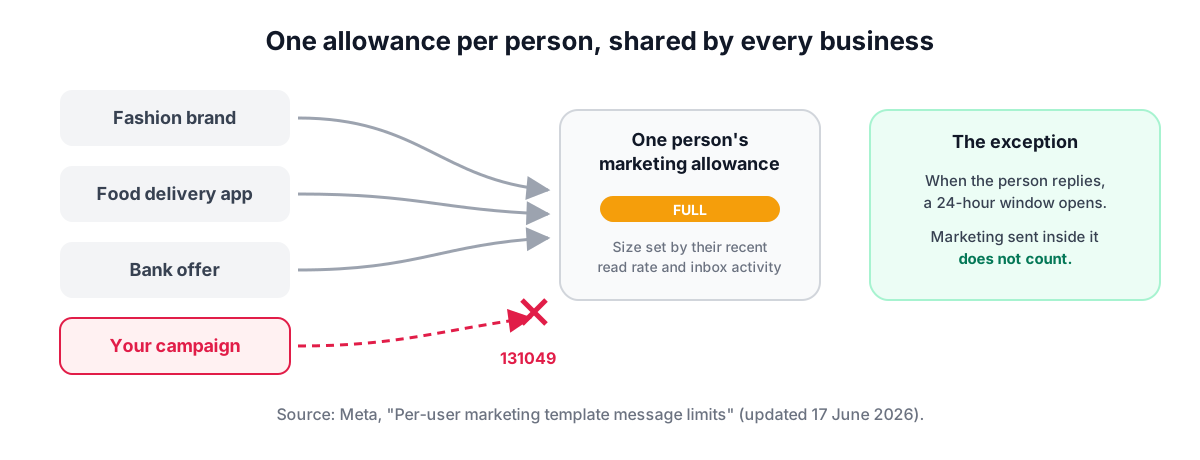
So a contact can be capped even if your business never messaged them before: other brands' marketing to the same person uses up the same allowance. The limit applies to the marketing category only.
What 131049 is not
131049 is often confused with other failures that look alike in a delivery report. Each has a different cause and a different fix (Meta error codes).
| Code | What Meta says it means | Retry? |
|---|---|---|
| 131049 | Not delivered to maintain healthy ecosystem engagement (per-user marketing limit) | Yes, after at least 24 hours |
| 131050 | The person chose to stop marketing messages from your business | No, they will not receive them |
| 130472 | Not sent because the person is in a Meta marketing message experiment | See Meta's experiments page |
| 131026 | Number not on WhatsApp, terms not accepted, or app too old | Only after the person fixes it |
It is also not a ban. It applies to one recipient and one marketing message at a time, so other contacts and other message types keep working.
How to reduce it
No provider can switch this limit off; it is applied inside WhatsApp. What you control is which messages are marketing, who receives them and when.
- Use utility templates for genuinely transactional content. Order confirmations, booking reminders, payment and account updates qualify as utility when they are non-promotional and specific to the person (Meta template categorization). The per-user limit is a marketing limit, and utility templates are free when sent inside an open service window (Meta pricing).
- Get people to reply. A reply opens a 24-hour window in which marketing messages do not count toward the limit and you can send free-form messages. Quick-reply buttons, questions and Click-to-WhatsApp ads all start conversations from the customer's side.
- Send marketing to people who read it. The limit tracks each person's recent marketing read rate. Prune contacts who have not read your last several campaigns, and target segments that recently engaged instead of the full list.
- Send less often, and make each message count. Fewer, more relevant campaigns protect your read rate, and with it your future deliverability.
- Wait 24 hours, then retry once. Meta's guidance for 131049 is to wait at least 24 hours before resending (Meta error codes).
- Consider the Marketing Messages API. Meta states it delivers up to 9% more marketing messages than the standard Cloud API for high-engagement content (Meta platform overview). That is Meta's own figure and depends on content quality.
What not to do
- Do not resend within 24 hours. Meta says early resends will likely fail again and blur your delivery reports. Repeated resends to capped people within 24 hours can block further attempts to them for up to 24 hours (Meta per-user limits). Testing the same campaign on the same phone again and again triggers this too.
- Do not relabel promotions as utility. A message with any promotional content, such as an order update that includes an offer, is marketing. Meta can switch a template to marketing instantly, and repeated misuse can rate-limit utility sending or strip utility status from every template on the account for 7 to 30 days (Meta template categorization).
- Do not trust a "sent" count alone. These drops arrive as webhooks after sending. Judge a campaign on delivered and read numbers.
How common is it?
Public numbers are scarce. One UAE agency, Adjoltz, published a breakdown for a single retail account: 14,899 messages from 18 June to 22 August 2026. There, 131049 caused 89.1% of all delivery failures, and 8.3% of marketing sends were dropped (Adjoltz). It is one account in one market, so treat it as a reference point, not a norm.
If a small campaign shows a much higher failure rate, check four things: whether every message used a marketing template, whether any numbers got the same campaign more than once in 24 hours, whether the contacts have read or replied to you recently, and whether any of them messaged you in the last 24 hours.
Sources
All pages were checked on 5 October 2026.
- Per-user marketing template message limits, Meta for Developers
- WhatsApp error codes, Meta for Developers
- Marketing templates, Meta for Developers
- Template categorization, Meta for Developers
- Pricing on the WhatsApp Business Platform, Meta for Developers
- About the WhatsApp Business Platform and Marketing Messages API overview, Meta for Developers
- Developer forum thread on 131049, Meta Developer Community
- WhatsApp error 131049: sent, accepted, never delivered, Adjoltz, 23 August 2026
Frequently asked questions
What does WhatsApp error 131049 mean?
It means "This message was not delivered to maintain healthy ecosystem engagement". WhatsApp chose not to deliver a marketing template because the recipient has reached their per-user marketing limit, which WhatsApp sets from that person's recent marketing read rate and inbox activity.
Is error 131049 a ban on my WhatsApp number?
No. It applies to one recipient and one marketing message at a time. Your number, your other contacts and your utility and service messages are not affected.
Am I charged for messages that fail with 131049?
No. Meta charges per delivered template message, so a template that is not delivered is not charged.
How long should I wait before retrying after error 131049?
At least 24 hours, per Meta. Resending earlier will likely fail again, and repeated resends within 24 hours can block further attempts to those recipients for up to 24 hours.
Do utility templates get error 131049?
The per-user limit is a marketing limit. Utility templates are for non-promotional messages specific to the person, such as order or booking updates. Labelling promotional content as utility breaks Meta's rules and can cost your account its utility templates for 7 to 30 days.
How do I reduce 131049 failures?
Send marketing to contacts who recently read your messages, send less often, encourage replies so a 24-hour service window opens, use utility templates only for genuinely transactional content, and wait 24 hours before a single retry.
Want this run for you, not by you?
SambhavTech sets up, runs, and optimizes WhatsApp Business for growing companies. Book a free assessment call.
Book a strategy call →